
Users
inquiryUserInfo
Retrieve authorized user details with an access token.
Overview
POST /v1/users/inquiryUserInfo returns user attributes based on scopes granted through my.getAuthCode. Pass the accessToken issued by applyToken; the response includes profile details such as login identifiers, name, avatar, and contact info when authorized.
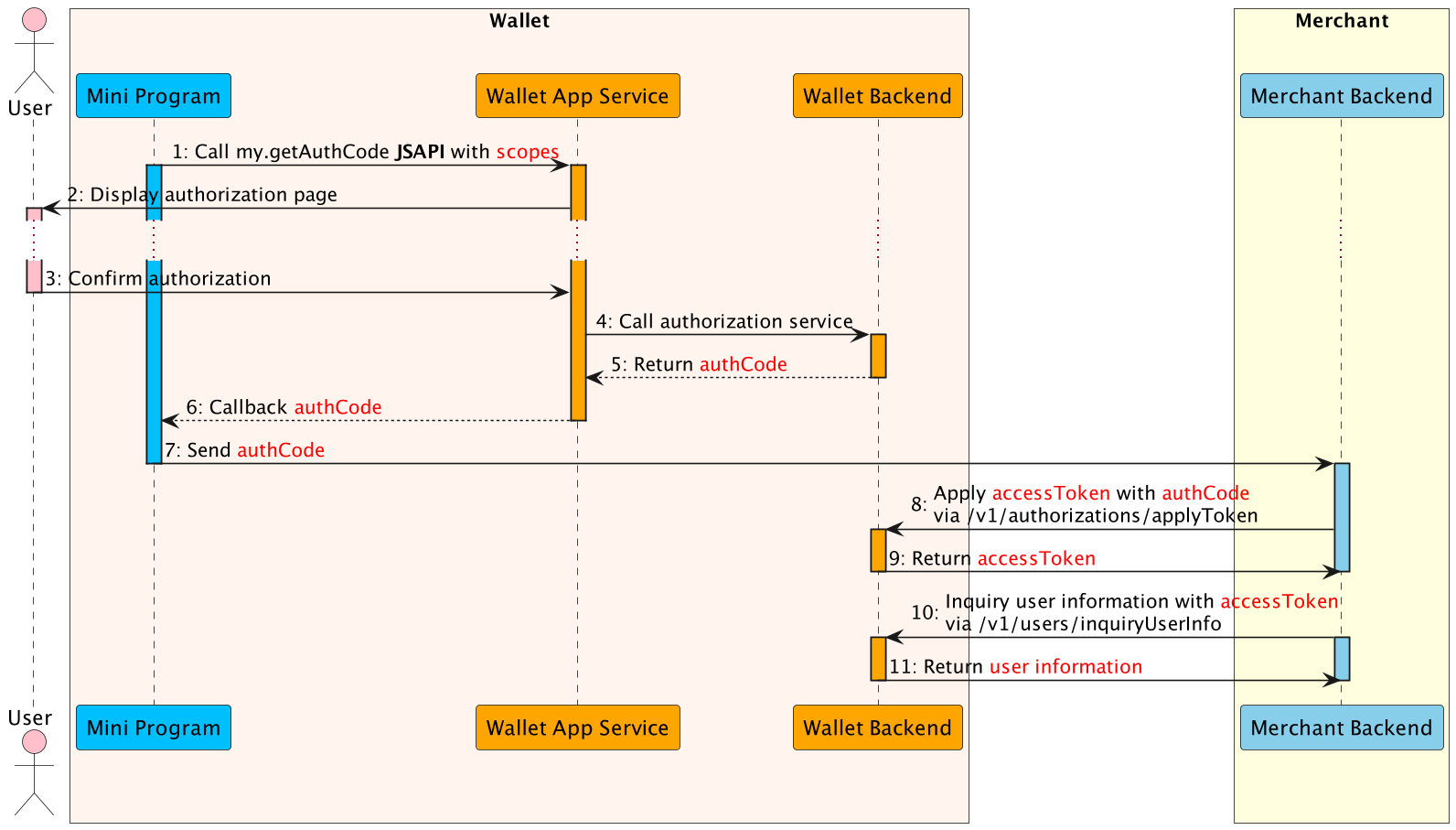
- Mini Program calls
my.getAuthCodewith the desired scopes to request authorization. - Wallet app renders the authorization page to the user.
- User reviews and approves the authorization in the super app.
- Wallet app service submits the authorization result to the wallet backend.
- Wallet backend validates the authorization and generates an
authCode. - Wallet app service returns the
authCodeto the Mini Program. - Mini Program forwards the
authCodeto the merchant backend. - Merchant backend invokes
/v1/authorizations/applyTokenwith theauthCodeto obtain tokens. - Wallet backend returns
accessToken(and refresh token) to the merchant backend. - Merchant backend calls
/v1/users/inquiryUserInfowith theaccessToken. - Wallet backend responds with user information corresponding to the granted scopes.
Endpoint
| Method | Path |
|---|---|
POST | /v1/users/inquiryUserInfo |
API Structure
A message consists of a header and body. The following sections are focused on the body structure. For the header structure, see: OpenAPIs Overview.
Request
| Field | Type | Required | Description | Example |
|---|---|---|---|---|
accessToken | string | Yes | Access token for querying user info (max 128 characters; disallow @, #, ?). Obtain via applyToken. | "281010033AB2F588D14B43238637264FCA5AAF35xxxx" |
extendInfo | string | No | Optional metadata (max 4096 characters; no @, #, ?). | { "memo": "memo" } |
{
  "accessToken": "281010033AB2F588D14B43238637264FCA5AAF35xxxx"
}
Response
| Field | Type | Required | Description |
|---|---|---|---|
result | object | Yes | Outcome metadata containing status and error codes. |
userInfo | object | No | User attributes allowed by the authorized scopes. Returned when result.resultStatus is S. |
{
  "result": {
    "resultCode": "SUCCESS",
    "resultStatus": "S",
    "resultMessage": "success"
  },
  "userInfo": {
    "userId": "1000001119398804",
    "loginIdInfos": [
      {
        "loginIdType": "MOBILE_PHONE",
        "maskLoginId": "964*******01"
      }
    ],
    "userName": {
      "fullName": "Jack Second Third Sparrow",
      "firstName": "Jack",
      "secondName": "Second",
      "thirdName": "Third",
      "lastName": "Sparrow"
    },
    "avatar": "https://example.com/avatar.png",
    "gender": "M",
    "birthDate": "2020-07-25",
    "nationality": "IRQ",
    "contactInfos": [
      {
        "contactType": "MOBILE_PHONE",
        "contactNo": "964*******01"
      }
    ],
    "extendInfo": {}
  }
}
Result Processing Logic
| Status | Description |
|---|---|
S | Inquiry succeeded. Use userInfo data per the authorized scopes. |
U | Result unknown (resultCode: UNKNOWN_EXCEPTION). Retry or review Common error codes. |
F | Inquiry failed. Inspect resultCode and see Error codes. |
Error Codes
| Error Code | Result Status | Message | Next Step |
|---|---|---|---|
INVALID_ACCESS_TOKEN | F | Access token invalid. | Obtain a new authorization code via my.getAuthCode, then exchange using applyToken. |
EXPIRED_ACCESS_TOKEN | F | Access token expired. | Refresh using applyToken with the refreshToken. |