
Flows
Agreement Payment
End-to-end guide for setting up recurring payments via QiCard agreement authorization.
Overview
This flow covers the agreement payment experience where users authorize recurring or auto-debit payments without requiring approval for each transaction. The merchant first obtains user consent via qicardSignContract, then can charge the user automatically using POST /v1/payments/pay (agreement mode) with the signed agreement token.
Agreement payment is part of the
pay API and requires the special scope AGREEMENT_PAY to be authorized during the agreement setup phase.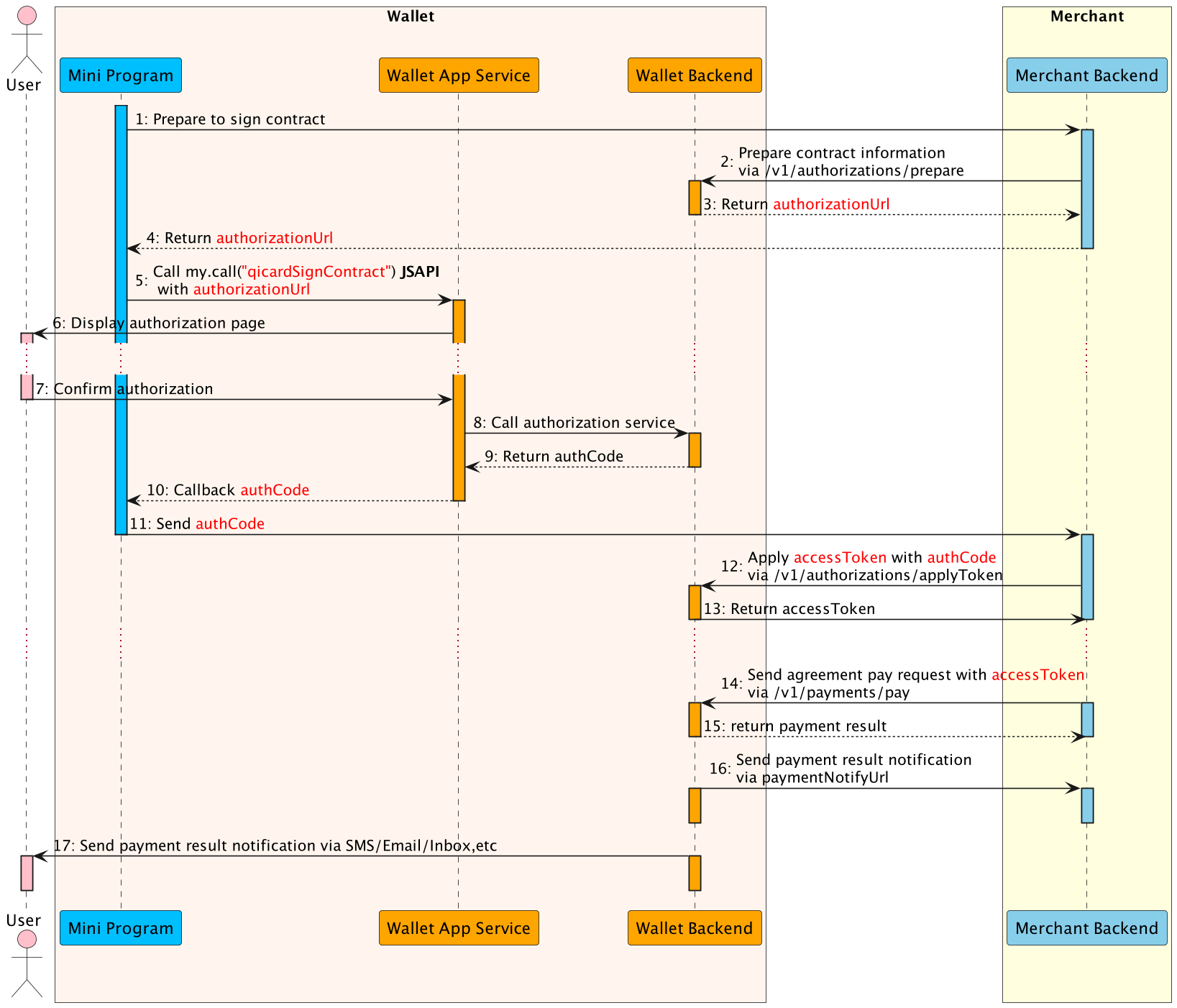
Flow Steps
- The Mini Program calls merchant backend to prepare the contract.
- The merchant backend calls this prepare API with contract information to prepare the contract.
- The E-Wallet backend returns authorization information to the merchant backend, such as authorizationUrl.
- The merchant backend passes the authorization information to the Mini Program.
- The Mini Program calls the my.call("qicardSignContract") JSAPI with authorizationUrl to conduct the authorization.
- The E-Wallet App Service displays the authorization page with contract information provided in Step 2.
- The user confirms the authorization agreement pay in the authorization page.
- The E-Wallet App Service calls authorization service and execute the authorization process.
- When the authorization reaches the final status, the E-wallet backend returns the authCode to the Mini Program (Step 10).
- The Mini Program sends the authCode merchant backend.
- The merchant backend calls this applyToken API with authCode to apply the accessToken(Step 12).
- The E-Wallet backend returns accessToken information to the merchant backend, such as accessToken, refreshToken, etc.
- The merchant backend calls this payment API with accessToken to deduct money from user's balance silently without user operation(Step 14).
- The E-wallet backend returns the payment result to the merchant backend instantly(Step 15).
- Also the E-wallet backend notifies the merchant backend of the payment result with paymentNotifyUrl provided in Step 14(Step 16).
- Finally, E-wallet backend notifies the user of the payment result via SMS/Email/Inbox message (Step 17).
Request Structure
POST /v1/payments/pay
Content-Type: application/json

{
  "productCode": "51051000101000100031",
  "paymentRequestId": "UDQzzvxwvyvUDxGqhMHUlIBpGKydOQC6",
  "paymentAuthCode": "0000000002202310013fQ6vpiUNV79nT00006725",
  "paymentAmount": {
    "currency": "IQD",
    "value": "100000"
  },
  "order": {
    "orderDescription": "Monthly subscription payment"
  },
  "paymentExpiryTime": "2024-01-18T16:10:36+03:00",
  "paymentNotifyUrl": "https://www.merchant.com/paymentNotifyxxxx"
}
Field Notes
productCode: agreement payment product identifier defined by the wallet (e.g.,"51051000101000100031").paymentRequestId: unique ID per payment (max 64 characters) for idempotence.paymentAuthCode: required for agreement payments; this is theaccessTokenobtained fromapplyTokenafter agreement signing.paymentAmount.value: value in IQD fils; ensure it matches the order total.order.buyer.referenceBuyerId: optional in agreement payment; if provided, must match thecustomerIdassociated with the agreement.paymentExpiryTime: optional ISO 8601 timestamp to auto-close the order.paymentNotifyUrl: HTTPS endpoint to receive asynchronous payment results.extendInfo: JSON string for custom metadata (max 2048 chars).
Ensure the
paymentAuthCode is valid and matches the user who signed the agreement. Mismatches will be rejected by the wallet.Response
{
  "result": {
    "resultStatus": "S",
    "resultCode": "SUCCESS",
    "resultMessage": "Success."
  },
  "paymentId": "2023103011121280010016679410005274x",
  "paymentTime": "2023-10-30T09:17:13+03:00"
}
Response Interpretation
result.resultStatus = S: payment completed successfully; update order status immediately.result.resultStatus = U: wallet returned an unknown status; wait for notification or poll/v1/payments/inquiryPayment.result.resultStatus = F: payment failed. Inspectresult.resultCode(e.g.,USER_BALANCE_NOT_ENOUGH,INVALID_ACCESS_TOKEN,AUTH_CODE_ALREADY_USED) and provide remediation to the user.
Agreement payments typically complete synchronously (status
S or F), unlike cashier payments which return status A (accepted) and require a redirect.Common Error Codes
| Status | resultCode | Description | Recommended Action |
|---|---|---|---|
U | PAYMENT_IN_PROCESS | Payment still processing. | Wait for wallet notification or poll /v1/payments/inquiryPayment. |
F | PAYMENT_AMOUNT_EXCEED_LIMIT | Amount exceeds wallet limit. | Send smaller amount or request higher limit. |
F | USER_BALANCE_NOT_ENOUGH | User's wallet balance insufficient. | Notify user to top up balance. |
F | USER_STATUS_ABNORMAL | User account restricted. | Instruct user to resolve with wallet support. |
F | PARTNER_STATUS_ABNORMAL | Merchant account restricted. | Resolve merchant compliance issues before retrying. |
F | RISK_REJECT | Blocked by risk engine. | Request user to try later or different channel. |
F | CURRENCY_NOT_SUPPORT | Unsupported currency. | Use IQD or permitted currency. |
F | INVALID_ACCESS_TOKEN | Access token invalid/expired. | Re-run agreement signing flow to obtain new token. |
F | AUTH_CODE_ALREADY_USED | Authorization code already consumed. | Generate new authCode via prepare + qicardSignContract. |
F | INVALID_CODE | Authorization code is illegal. | Verify authCode format and expiry. |
F | USER_AMOUNT_EXCEED_LIMIT | Payment amount exceeds user's limit. | Reduce amount or request user to increase limit. |