
Merchants
inquiryMerchantInfo
Retrieve authorized merchant details with an access token.
Overview
POST /v1/merchants/inquiryMerchantInfo returns merchant attributes based on the accessToken issued by applyToken. The response includes merchant profile details such as merchant ID, business name, and logo when authorized.
This API requires Business (Merchant) User Scopes, not Customer User Scopes. When calling
my.getAuthCode, use merchant-specific scopes such as MERCHANT_ID, MERCHANT_NAME, or MERCHANT_LOGO. For more details on scope types, see getAuthCode - Scope Reference.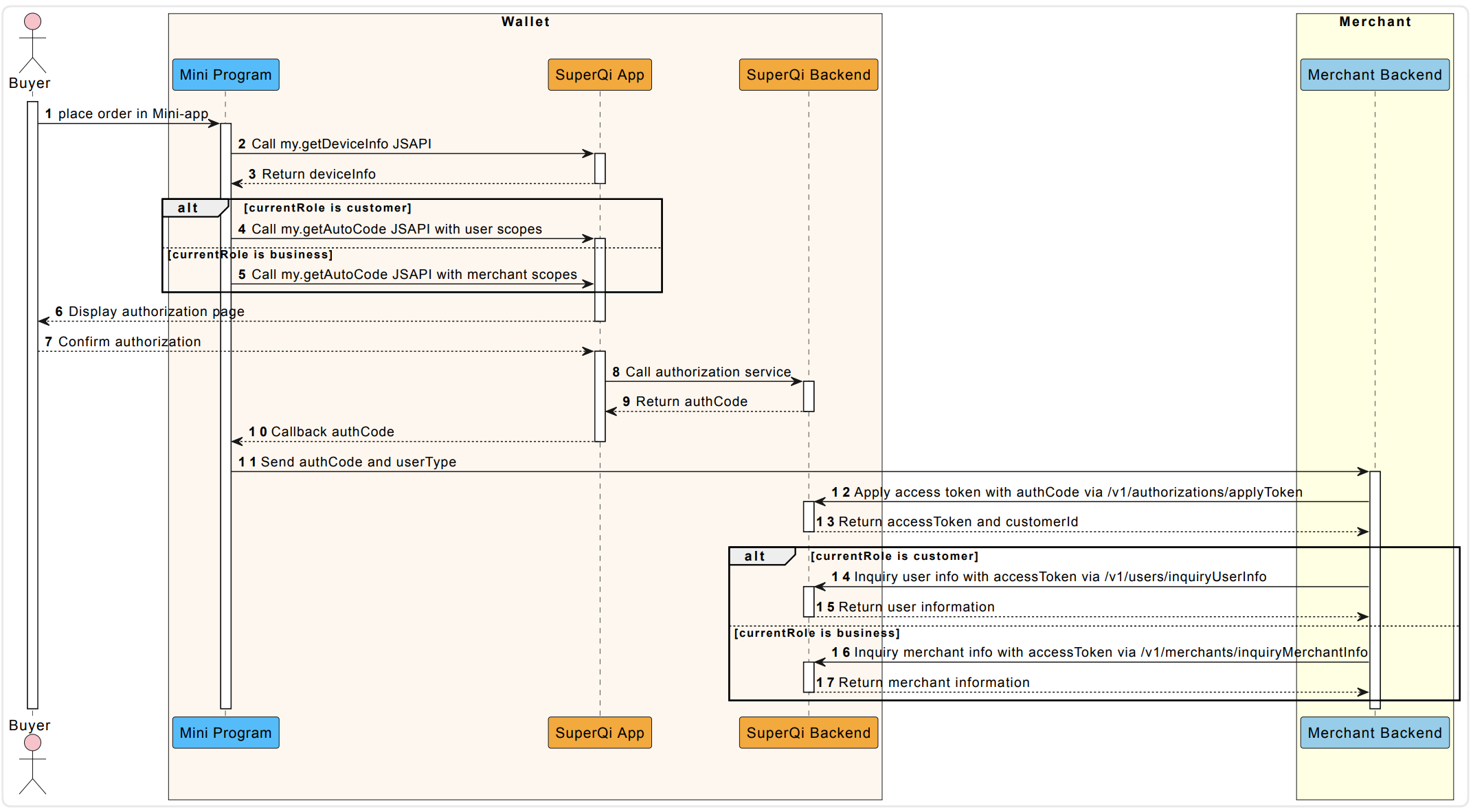
- Place order in Mini-app – The Buyer initiates an order through the Mini Program.
- Call my.getDeviceInfo JSAPI – The Mini Program calls the Super Qi App to retrieve device information.
- Return deviceInfo – The Super Qi App returns the device information back to the Mini Program.
- Call my.getAutoCode JSAPI with user scopes – If the currentRole is "customer", the Mini Program requests an authorization code with user-level scopes.
- Call my.getAutoCode JSAPI with merchant scopes – If the currentRole is "business", the Mini Program requests an authorization code with merchant-level scopes.
- Display authorization page – The Super Qi App shows an authorization page to the Buyer.
- Confirm authorization – The Buyer confirms/approves the authorization request.
- Call authorization service – The Super Qi App calls the Super Qi Backend's authorization service.
- Return authCode – The Super Qi Backend returns an authorization code.
- Callback authCode – The Super Qi App sends the authCode back to the Mini Program via callback.
- Send authCode and userType – The Mini Program sends the authCode and userType to the Merchant Backend.
- Apply access token with authCode via /v1/authorizations/applyToken – The Merchant Backend exchanges the authCode for an access token by calling the Super Qi Backend.
- Return accessToken and customerId – The Super Qi Backend returns the accessToken and customerId.
- Inquiry user info with accessToken via /v1/users/inquiryUserInfo – If currentRole is "customer", the Merchant Backend fetches user details using the access token.
- Return user information – The Super Qi Backend returns the user information.
- Inquiry merchant info with accessToken via /v1/merchants/inquiryMerchantInfo – If currentRole is "business", the Merchant Backend fetches merchant details using the access token.
- Return merchant information – The Super Qi Backend returns the merchant information.
Endpoint
| Method | Path |
|---|---|
POST | /v1/merchants/inquiryMerchantInfo |
API Structure
A message consists of a header and body. The following sections are focused on the body structure. For the header structure, see: OpenAPIs Overview.
Request
| Field | Type | Required | Description | Example |
|---|---|---|---|---|
accessToken | string | Yes | Access token for querying merchant info (max 128 characters; disallow @, #, ?). Obtain via applyToken. | "281010033AB2F588D14B43238637264FCA5AAF35xxxx" |
extendInfo | string | No | Optional metadata (max 4096 characters; no @, #, ?). | { "memo": "memo" } |
{
  "accessToken": "281010033AB2F588D14B43238637264FCA5AAF35xxxx"
}
Response
| Field | Type | Required | Description |
|---|---|---|---|
result | object | Yes | Outcome metadata containing status and error codes. |
merchantInfo | object | No | Merchant attributes allowed by the authorized scopes. Returned when result.resultStatus is S. |
MerchantInfo
| Field | Type | Description |
|---|---|---|
merchantId | string | The unique merchant ID in Super Qi. |
merchantName | string | The English name of the merchant in Super Qi. |
merchantNameArabic | string | The Arabic name of the merchant in Super Qi. |
merchantLogo | string | The merchant logo URL. |
Result Processing Logic
| Status | Description |
|---|---|
S | The inquiry is successful. Use the accessToken to access merchant information within the corresponding scope. The corresponding result.resultCode is SUCCESS and the result.resultMessage is Success. |
U | The status of the inquiry is unknown. The corresponding result.resultCode is UNKNOWN_EXCEPTION and result.resultMessage is "An API calling is failed, which is caused by unknown reasons." For details, see the Common error codes section. |
F | The inquiry is failed. The corresponding result.resultCode and result.resultMessage are various based on different situations. For details, see the Error codes section. |
Error Codes
Error codes are usually classified into the following categories:
- Common error codes: are common for all OpenAPIs.
- API-specific error codes: are listed in the following table.
| Result Status | Result Code | Result Message |
|---|---|---|
F | INVALID_ACCESS_TOKEN | The access token is not valid. |
F | EXPIRED_ACCESS_TOKEN | The access token is expired. |
Samples
Request
{
  "accessToken": "281010033AB2F588D14B43238637264FCA5AAF35xxxx"
}
Response
{
  "result": {
    "resultCode": "SUCCESS",
    "resultStatus": "S",
    "resultMessage": "Success"
  },
  "merchantInfo": {
    "merchantId": "216629765986934560843",
    "merchantName": "KFC",
    "merchantNameArabic": ""
  }
}