
Flows
Cashier Payment
End-to-end guide for redirecting users to the wallet cashier flow.
Overview
This flow covers the standard cashier payment experience where the Mini Program hands off to the wallet hosted cashier page. Use POST /v1/payments/pay (cashier mode) to create the order, then open the cashier via my.tradePay.
Cashier payment is part of the
pay API, which supports both cashier and agreement payment scenarios.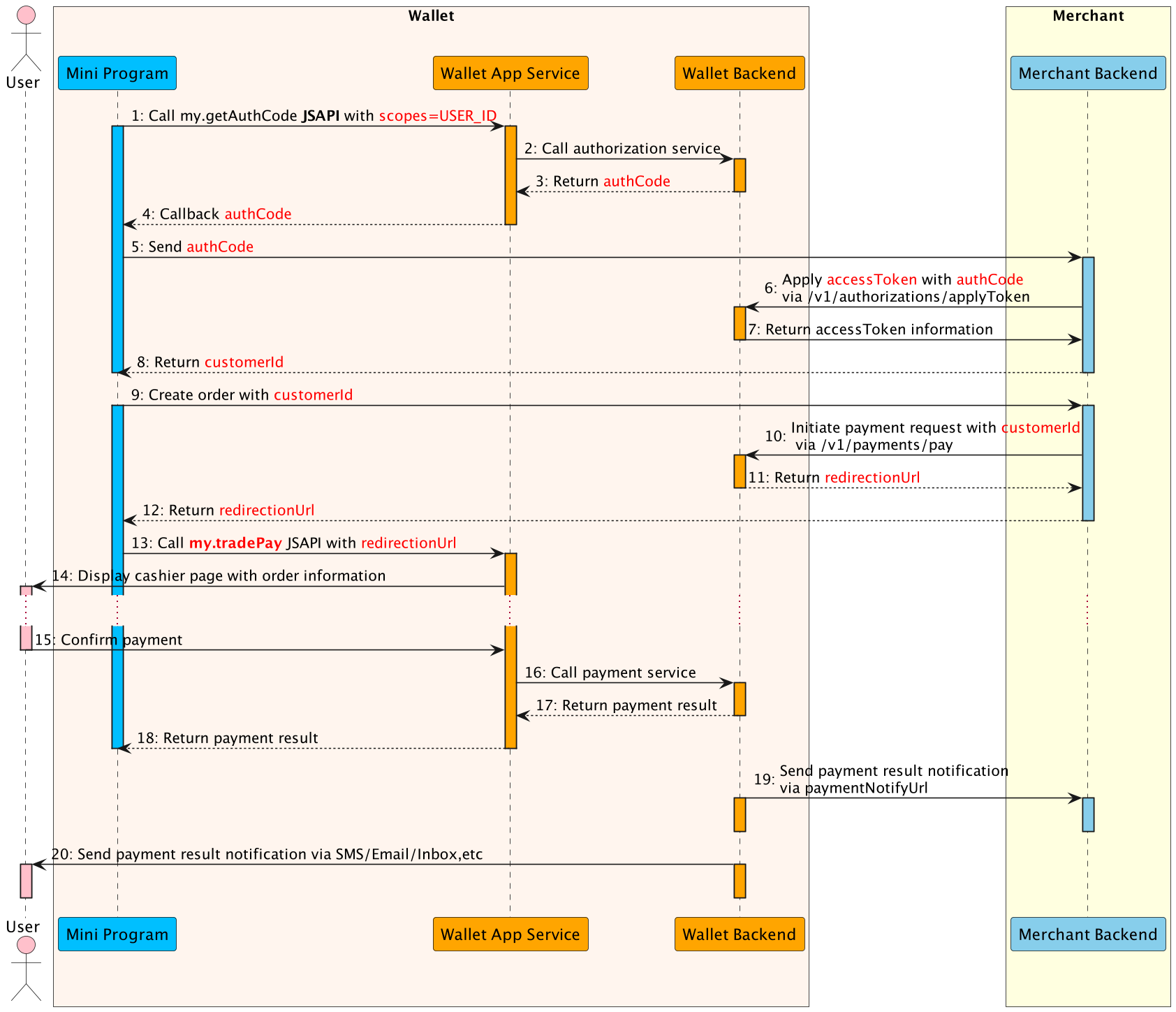
Flow Steps
- The Mini Program calls this my.getAuthCode JSAPI with specific scopes(USER_ID) to request an authorization code.
- The E-wallet App service calls authorization service to processes the authorization information.
- The E-wallet backend verifies the authorization information, generates the authCode and returns.
- The E-wallet App service returns the authCode to the Mini Program.
- The Mini Program sends the authCode to the merchant backend.
- The merchant backend calls the applyToken API with authCode to apply the accessToken.
- The E-Wallet backend returns accessToken information to the merchant backend, such as customerId, accessToken, refreshToken, etc.
- The Mini Program creates an order with customerId.
- The merchant backend calls the payment API to initiate payment flow, including customerId as referenceBuyerId, paymentNotifyUrl(optional), etc.
- The E-Wallet backend returns payment detail information the merchant backend, such as redirectionUrl.
- The merchant backend passes the payment detail information to the Mini Program.
- The Mini Program calls the my.tradePay JSAPI with redirectionUrl to conduct the payment.
- The E-Wallet App Service displays the cashier page with order information, such as amount, order details, etc.
- The user confirms the payment in the cashier page.
- The E-Wallet App Service calls payment service and execute the payment process.
- When the payment reaches the final status, the E-wallet backend returns the payment result to the Mini Program (Step 18).
- Also the E-wallet backend notifies the merchant backend of the payment result with paymentNotifyUrl provided in Step 10(Step 19).
- Finally, E-wallet backend notifies the user of the payment result via SMS/Email/Inbox message (Step 20).
Request Structure
POST /v1/payments/pay
Content-Type: application/json

{
  "productCode": "51051000101000000011",
  "paymentRequestId": "UDQzzvxwvyvUDxGqhMHUlIBpGkydOQC6",
  "paymentAmount": {
    "currency": "IQD",
    "value": "100000"
  },
  "order": {
    "orderDescription": "order_description",
    "buyer": {
      "referenceBuyerId": "216610000000003660xxxx"
    }
  },
  "paymentExpiryTime": "2024-01-18T16:10:36+03:00",
  "paymentNotifyUrl": "https://www.merchant.com/paymentNotifyxxxx",
  "paymentRedirectUrl": "https://www.merchant.com/order/return",
  "voidNotifyUrl": "https://www.merchant.com/payment/void",
  "extendInfo": "{\"memo\":\"channel=miniapp\"}"
}
Field Notes
productCode: cashier product identifier defined by the wallet (e.g.,"51051000101000000011").paymentRequestId: unique ID per payment (max 64 characters) for idempotence.paymentAmount.value: value in IQD fils; ensure it matches the order total.order.buyer.referenceBuyerId: must match thecustomerIdreturned byapplyToken.paymentExpiryTime: optional ISO 8601 timestamp to auto-close the order.paymentNotifyUrl: HTTPS endpoint to receive asynchronous payment results.paymentRedirectUrl: optional URL for post-payment completion/cancel page.voidNotifyUrl: optional endpoint for void notifications.extendInfo: JSON string for custom metadata (max 2048 chars).
Response
{
  "result": {
    "resultCode": "ACCEPT",
    "resultStatus": "A",
    "resultMessage": "accept"
  },
  "paymentId": "2023120611121280010016600900000xxxx",
  "redirectActionForm": {
    "redirectionUrl": "https://www.wallet.com/cashier?orderId=xxxxxxx"
  }
}
Response Interpretation
result.resultStatus = A: payment accepted; redirect the user usingredirectActionForm.redirectionUrlviamy.tradePay.result.resultStatus = S: payment completed instantly; update order status and wait for notifications.result.resultStatus = U: wallet returned an unknown status; do not mark success/failure yet—wait for notification or poll/v1/payments/inquiryPayment.result.resultStatus = F: payment failed. Inspectresult.resultCode(e.g.,USER_BALANCE_NOT_ENOUGH,RISK_REJECT,REPEAT_REQ_INCONSISTENT) and provide remediation to the user.
Common Error Codes
| Status | resultCode | Description | Recommended Action |
|---|---|---|---|
U | PAYMENT_IN_PROCESS | Payment still processing. | Wait for wallet notification or poll /v1/payments/inquiryPayment. |
F | PAYMENT_AMOUNT_EXCEED_LIMIT | Amount exceeds wallet limit. | Send smaller amount or request higher limit. |
F | USER_BALANCE_NOT_ENOUGH | User’s wallet balance insufficient. | Prompt user to top up balance. |
F | USER_STATUS_ABNORMAL | User account restricted. | Instruct user to resolve with wallet support. |
F | PARTNER_STATUS_ABNORMAL | Merchant account restricted. | Resolve merchant compliance issues before retrying. |
F | RISK_REJECT | Blocked by risk engine. | Request user to try later or different channel. |
F | CURRENCY_NOT_SUPPORT | Unsupported currency. | Use IQD or permitted currency. |
F | INVALID_ACCESS_TOKEN | Access token invalid/expired. | Re-run applyToken. |
F | REPEAT_REQ_INCONSISTENT | Duplicate paymentRequestId with different payload. | Reuse original payload or change paymentRequestId. |