
Authentication
Overview
This flow covers the user authentication process in Mini Programs, enabling merchants to obtain user authorization and access tokens. The flow consists of two key steps: requesting an authorization code via my.getAuthCode and exchanging it for access tokens via applyToken. These tokens allow merchants to access user data and perform authorized operations.
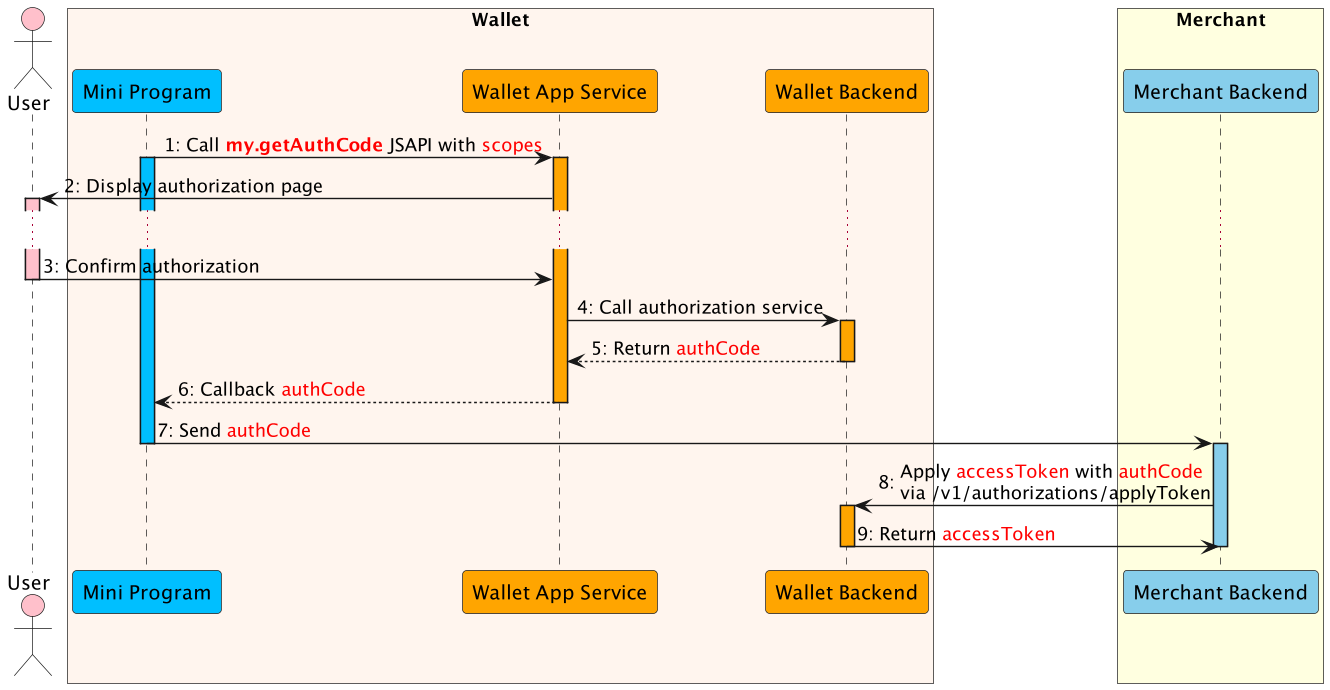
Flow Steps
Authorization Request Phase
- The Mini Program calls the my.getAuthCode JSAPI with specific scopes to request an authorization code.
- The E-wallet App processes the request and displays the authorization page that needs to be authorized.
- The user confirms the authorization in the super app.
- The E-wallet App service calls authorization service to processes the authorization information.
- The E-wallet backend verifies the authorization information, generates the authCode and returns.
- The E-wallet App service returns the authCode to the Mini Program.
- The Mini Program sends the authCode to the merchant backend.
- The merchant backend calls the applyToken API with authCode to apply the accessToken.
- The E-Wallet backend returns accessToken information to the merchant backend, such as accessToken, refreshToken, etc.
auth_base, USER_ID, USER_LOGIN_ID, and HASH_LOGIN_ID do not require explicit user consent and are granted automatically.Token Exchange Phase
After obtaining the authorization code, the merchant exchanges it for access tokens:
1. Request Authorization Code (my.getAuthCode)
The Mini Program initiates the authentication flow by calling my.getAuthCode with the required scopes. This JSAPI prompts the user (if needed) and returns an authCode that represents the user's consent.
For more details, check the my.getAuthCode documentation.
2. Exchange for Access Token (applyToken)
The merchant backend securely exchanges the authCode for access tokens by calling POST /v1/authorizations/applyToken. This endpoint returns an accessToken, refreshToken, and customerId which are used for subsequent API calls.
For more details, check the applyToken endpoint documentation.
3. Token Refresh (applyToken with REFRESH_TOKEN)
When the accessToken expires, merchants can obtain a new token without user interaction by calling applyToken with grantType: REFRESH_TOKEN and the stored refreshToken. This maintains seamless user experience without re-authorization.
For more details, check the applyToken endpoint documentation.
Authorization Code Request
my.getAuthCode Parameters
my.getAuthCode({
  scopes: ['USER_ID'],
  success: (res) => {
    // Send res.authCode to merchant backend
    my.request({
      url: 'https://merchant.com/api/auth',
      method: 'POST',
      data: {
        authCode: res.authCode
      }
    });
  },
  fail: (err) => {
    console.log('Authorization failed:', err.authErrorScopes);
  }
});
Available Scopes
For the complete, authoritative list of scopes — covering both Customer User and Business (Merchant) User scopes and which support silent authorization — see the Scope Reference in getAuthCode.
- Internal Qi Merchants: Have access to all available scopes listed above.
- External Merchants: Can only access
auth_baseandUSER_IDscopes.
Success Response
{
  "authCode": "0000000001T1dc0W0tv44B0BD00007826",
  "authSuccessScopes": ["USER_ID"]
}
Failure Response
{
  "authErrorScopes": {
    "auth_user": "10001"
  }
}
Token Exchange Request
applyToken Request Structure
POST /v1/authorizations/applyToken
Content-Type: application/json

{
  "grantType": "AUTHORIZATION_CODE",
  "authCode": "2810111301lGzcM9CjlF91WH00039190xxxx"
}
Field Notes
grantType: UseAUTHORIZATION_CODEto exchange an authCode, orREFRESH_TOKENto refresh an expired access token.authCode: The authorization code obtained frommy.getAuthCode(required whengrantTypeisAUTHORIZATION_CODE).refreshToken: The refresh token from a previousapplyTokencall (required whengrantTypeisREFRESH_TOKEN).extendInfo: Optional JSON string for additional metadata (max 4096 characters).
accessToken or refreshToken to the Mini Program client. Store them securely on your backend server.Token Exchange Response
{
  "result": {
    "resultCode": "SUCCESS",
    "resultStatus": "S",
    "resultMessage": "success"
  },
  "accessToken": "281010033AB2F588D14B43238637264FCA5AAF35xxxx",
  "accessTokenExpiryTime": "2023-06-06T12:12:12+08:00",
  "refreshToken": "2810100334F62CBC577F468AAC87CFC6C9107811xxxx",
  "refreshTokenExpiryTime": "2023-06-08T12:12:12+08:00",
  "customerId": "1000001119398804xxxx"
}
Response Interpretation
result.resultStatus = S: token exchange successful; store the tokens andcustomerIdsecurely.result.resultStatus = U: unknown exception; retry the request or check server logs.result.resultStatus = F: exchange failed. Inspectresult.resultCode(e.g.,INVALID_CODE,EXPIRED_CODE,USED_CODE) and handle accordingly.
Response Fields
accessToken: Token used to authenticate API requests on behalf of the user. Has a shorter lifespan.accessTokenExpiryTime: ISO 8601 timestamp indicating when the access token expires.refreshToken: Token used to obtain a new access token without user interaction.refreshTokenExpiryTime: ISO 8601 timestamp indicating when the refresh token expires.customerId: Unique identifier for the user; use this asreferenceBuyerIdin payment requests.
Token Refresh Request
When the accessToken expires, use the refresh token to obtain a new one:
POST /v1/authorizations/applyToken
Content-Type: application/json

{
  "grantType": "REFRESH_TOKEN",
  "refreshToken": "2810110033AAB2F588D14B43238637264FCA5AAF35xxxx"
}
refreshToken also expires, the user must re-authorize via my.getAuthCode to obtain a new authorization code.Common Error Codes
my.getAuthCode Errors
| Code | Description | Recommended Action |
|---|---|---|
3 | Unknown error occurred. | Retry the request or check app logs. |
1000 | Unknown error occurred. | Retry the request or check app logs. |
1001 | User cancelled the authorization. | Prompt user to try again or explain why authorization is needed. |
1002 | App service error occurred. | Check network connectivity and retry. |
1003 | Request timed out. | Retry with a stable network connection. |
2001 | Pending agreement authorization. | Complete agreement setup first. |
applyToken Errors
| resultCode | resultStatus | Description | Recommended Action |
|---|---|---|---|
AUTH_CLIENT_UNSUPPORTED_GRANT_TYPE | F | Unsupported grant type. | Use AUTHORIZATION_CODE or REFRESH_TOKEN. |
INVALID_CODE | F | Authorization code is invalid. | Obtain a new authCode via my.getAuthCode. |
USED_CODE | F | Authorization code already used. | Obtain a new authCode via my.getAuthCode. |
EXPIRED_CODE | F | Authorization code expired. | Obtain a new authCode via my.getAuthCode. |
INVALID_REFRESH_TOKEN | F | Refresh token is invalid. | Re-authorize with my.getAuthCode to get new tokens. |
EXPIRED_REFRESH_TOKEN | F | Refresh token expired. | Re-authorize with my.getAuthCode to get new tokens. |
USED_REFRESH_TOKEN | F | Refresh token already used. | Use the tokens from the previous successful refresh. |