
Users
inquiryUserAccountList
Retrieve authorized user bank account list with an access token.
Overview
POST /v1/users/inquiryUserAccountList returns user bank account list based on scopes granted through my.getAuthCode. Pass the accessToken issued by applyToken; the response includes the list of bank accounts associated with the user when authorized.
To access user account information, you must request the
ACCOUNT_LIST scope when calling my.getAuthCode to obtain the authorization code.The ACCOUNT_LIST scope provides a more privacy-conscious alternative to CARD_LIST by returning only account numbers without any sensitive card information such as masked card numbers.
Flow
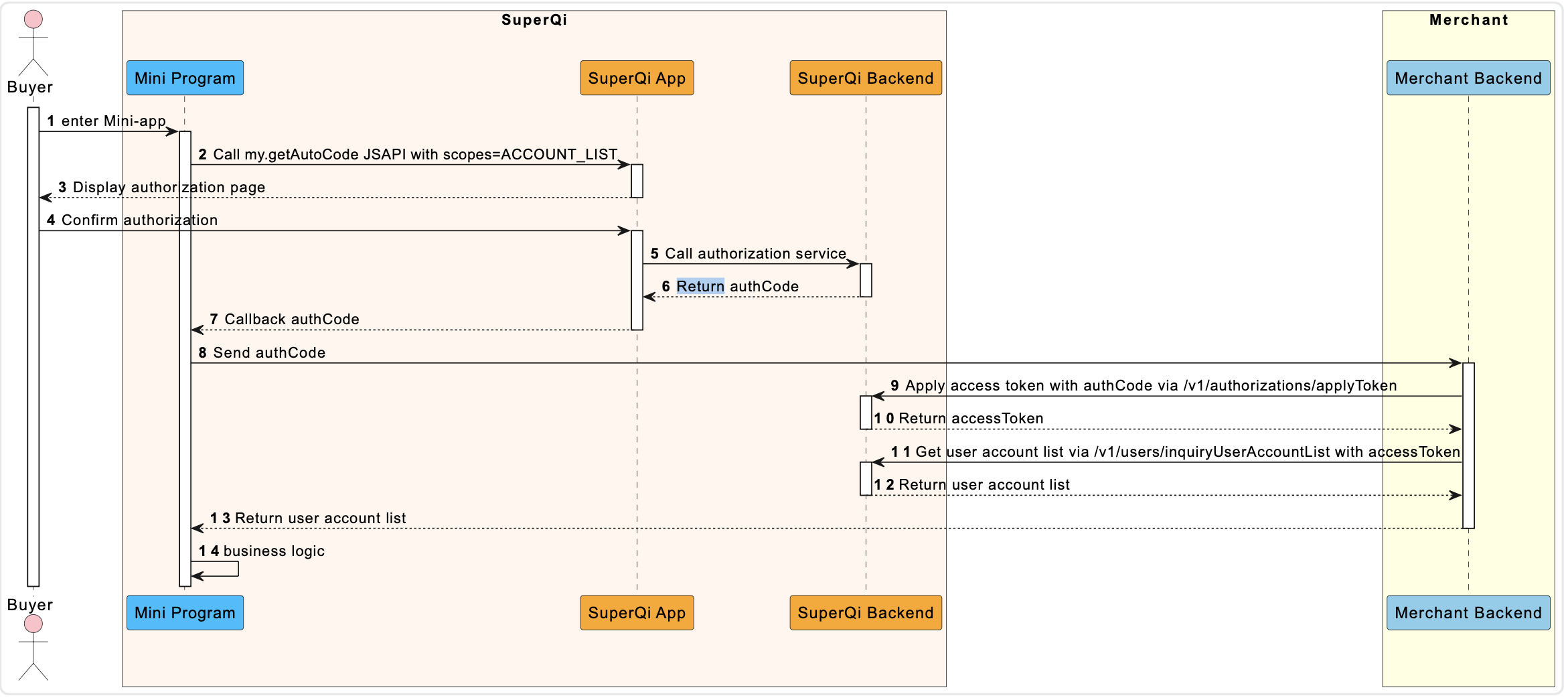
- User enters Mini-app - The buyer opens the merchant's Mini Program within the Super Qi App.
- Call my.getAuthCode JSAPI - The Mini Program calls
my.getAuthCodewithscopes=['ACCOUNT_LIST']to request user authorization. - Display authorization page - Super Qi App displays the authorization consent page to the user.
- Confirm authorization - The user reviews and confirms the authorization request.
- Call authorization service - Super Qi App sends the authorization request to Super Qi Backend.
- Return authCode - Super Qi Backend generates and returns the authorization code.
- Callback authCode - Super Qi App passes the authorization code back to the Mini Program.
- Send authCode - The Mini Program sends the authorization code to the Merchant Backend.
- Apply access token - Merchant Backend exchanges the authorization code for an access token via
/v1/authorizations/applyToken. - Return accessToken - Super Qi Backend returns the access token to the Merchant Backend.
- Get user account list - Merchant Backend calls
/v1/users/inquiryUserAccountListwith the access token. - Return user account list - Super Qi Backend returns the user's account list to the Merchant Backend.
- Return user account list - Merchant Backend passes the account list to the Mini Program.
- Business logic - The Mini Program processes the account information according to business needs.
Endpoint
| Method | Path |
|---|---|
POST | /v1/users/inquiryUserAccountList |
API Structure
A message consists of a header and body. The following sections are focused on the body structure. For the header structure, see: OpenAPIs Overview.
Request
| Field | Type | Required | Description | Example |
|---|---|---|---|---|
accessToken | string | Yes | Access token for querying user bank account list (max 128 characters; disallow @, #, ?). Obtain via applyToken. | "281010033AB2F588D14B43238637264FCA5AAF35xxxx" |
{
  "accessToken": "281010033AB2F588D14B43238637264FCA5AAF35xxxx"
}
Response
| Field | Type | Required | Description |
|---|---|---|---|
result | object | Yes | Outcome metadata containing status and error codes. |
accountList | array<AccountInfo> | No | User bank account list queried by the merchant. Must be returned when result.resultStatus is S. Returns empty array [] when user has not bound any bank account. |
AccountInfo
| Property | Type | Required | Description |
|---|---|---|---|
accountNumber | string | Yes | Account number (max 32 characters). |
{
  "result": {
    "resultCode": "SUCCESS",
    "resultStatus": "S",
    "resultMessage": "Success"
  },
  "accountList": [
    {
      "accountNumber": "12340001"
    },
    {
      "accountNumber": "12340002"
    },
    {
      "accountNumber": "12340003"
    }
  ]
}
Result Processing Logic
| Status | Description |
|---|---|
S | Inquiry succeeded. Use accessToken to access user information within the corresponding scope. |
U | Result unknown (resultCode: UNKNOWN_EXCEPTION, resultMessage: "An API calling is failed, which is caused by unknown reasons."). Retry or review Common error codes. |
F | Inquiry failed. Inspect resultCode and see Error codes. |
Error Codes
| Error Code | Result Status | Message | Next Step |
|---|---|---|---|
INVALID_ACCESS_TOKEN | F | The access token is not valid. | Obtain a new authorization code via my.getAuthCode, then exchange using applyToken. |
ACCESS_TOKEN_NOT_COVER_THE_SCOPE | F | The access token permission scope does not contain specified scope. | Check the permission for the access token and try again. |