
Messages
sendInbox
Send inbox messages to wallet users via access tokens.
Overview
POST /v1/messages/sendInbox enables merchants or Independent Software Vendors (ISV) to send inbox messages to wallet users using access tokens. This API allows you to deliver notifications, updates, and other messages directly to users' wallet inbox.
The message content is customizable through templates, allowing you to include dynamic parameters such as titles, content text, and deep links to specific pages within your Mini Program.
- Ensure the access token has the
NOTIFICATION_INBOXscope before attempting to send messages. - The
requestIdis idempotent—submitting the same ID multiple times will only send the message once. - Verify the access token is valid and not expired before making the API call.
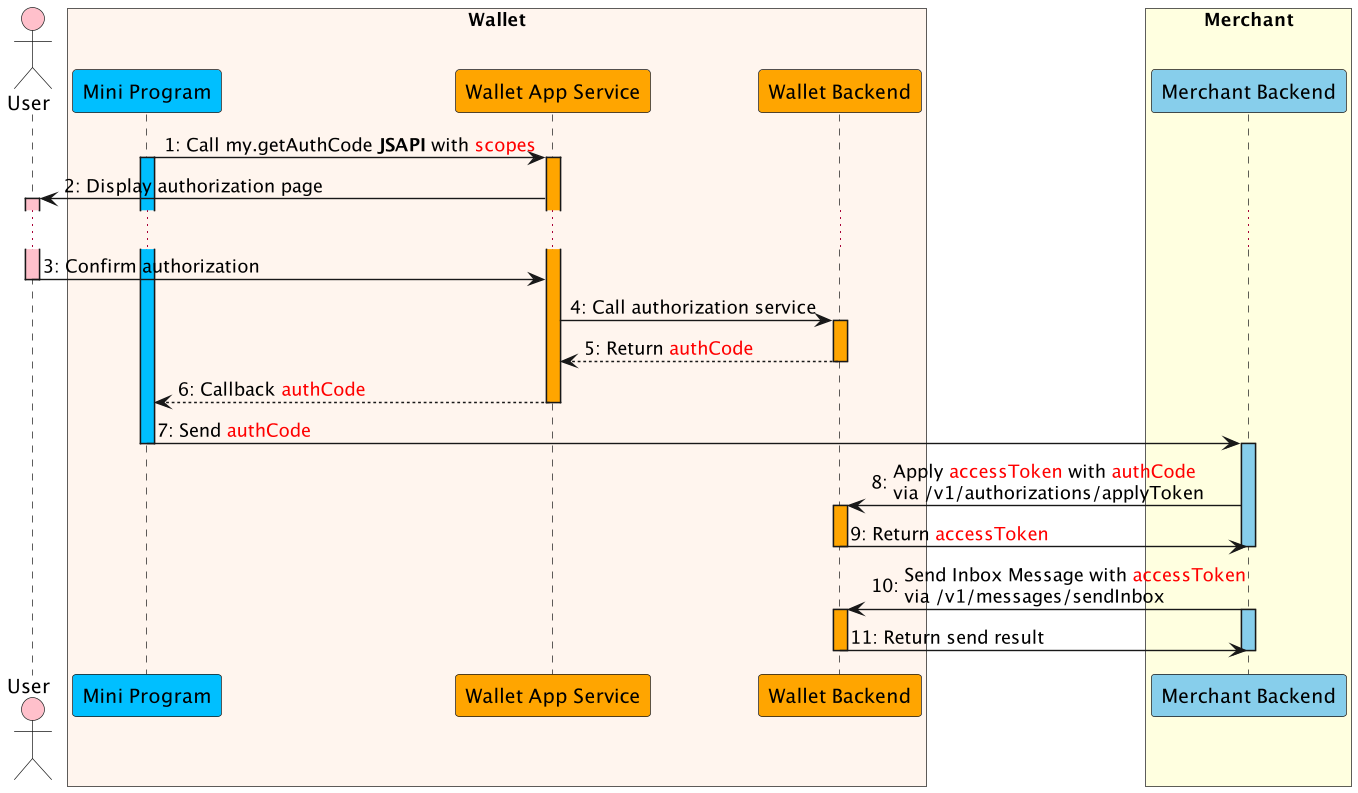
- The Mini Program calls the
my.getAuthCodeJSAPI with specific scopes(NOTIFICATION_INBOX) to request an authorization code. - The E-wallet App processes the request and displays the authorization page that needs to be authorized.
- The user confirms the authorization in the super app.
- The E-wallet App service calls authorization service to processes the authorization information.
- The E-wallet backend verifies the authorization information, generates the
authCodeand returns. - The E-wallet App service returns the
authCodeto the Mini Program. - The Mini Program sends the
authCodeto the merchant backend. - The merchant backend calls the
applyTokenAPI withauthCodeto apply theaccessToken. - The E-wallet backend returns
accessTokeninformation to the merchant backend, such as accessToken, refreshToken, etc. - The merchant backend calls this API with the
accessTokento send inbox message to the user. - The E-wallet backend returns the send result, including
messageId.
Endpoint
| Method | Path |
|---|---|
POST | /v1/messages/sendInbox |
API Structure
A message consists of a header and body. The following sections are focused on the body structure. For the header structure, see:
- Request header
- Response header
Request
| Field | Type | Required | Description | Example |
|---|---|---|---|---|
accessToken | string | Yes | Access token used to send inbox messages. Obtain via applyToken with NOTIFICATION_INBOX scope. Max length 128; no @#?. | "20191127190741010007000000777771xxxx" |
requestId | string | Yes | Unique request identifier for idempotency. Resubmitting the same requestId will not send duplicate messages. Max length 128; no @#?. | "20191127190741010007013213123xxxx" |
templateCode | string | Yes | Template code distinguishing different message templates. Max length 256; no @#?. | "MINI_APP_COMMON_INBOX" |
templates | array | Yes | Array of content template objects. Each object contains templateParameters with Title, Content, and Url fields. | See structure below |
Template Structure:
Each item in the templates array must include:
templateParameters.Title(string, required): The inbox message titletemplateParameters.Content(string, required): The inbox message content/bodytemplateParameters.Url(string, required): Deep link URL to navigate within the Mini Program (format:mini://platformapi/startapp?_ariver_appid={appId})
{
  "accessToken": "20191127190741010007000000777771xxxx",
  "requestId": "20191127190741010007013213123xxxx",
  "templateCode": "MINI_APP_COMMON_INBOX",
  "templates": [
    {
      "templateParameters": {
        "Title": "mini-inbox-title",
        "Content": "hello mini program",
        "Url": "mini://platformapi/startapp?_ariver_appid=888888"
      }
    }
  ]
}
Response
| Field | Type | Required | Description | Example |
|---|---|---|---|---|
result | object | Yes | Outcome metadata including status and error codes. | { "resultCode": "SUCCESS", "resultStatus": "S", "resultMessage": "success" } |
messageId | string | Conditional | Unique message identifier. Present when message is sent successfully. Max length 258; no @#?. | "20201235900212xxxx" |
extendInfo | string | No | Extended response metadata (max 4096 characters, no @#?). | "This is additional information" |
{
  "messageId": "20201235900212xxxx",
  "extendInfo": "",
  "result": {
    "resultCode": "SUCCESS",
    "resultStatus": "S",
    "resultMessage": "success"
  }
}
Result Processing Logic
| Status | Description |
|---|---|
S | Request succeeded. resultCode is SUCCESS and resultMessage is success. The inbox message was sent successfully. |
A | Request accepted. resultCode is ACCEPT; message processing initiated. |
U | Outcome unknown. resultCode is UNKNOWN_EXCEPTION; retry after checking Common error codes or logs. |
F | Request failed. Inspect resultCode and cross-reference Error codes. |
Error Codes
| Error Code | Result Status | Message | Next Step |
|---|---|---|---|
ACCESS_TOKEN_NOT_COVER_THE_SCOPE | F | Access token permission scope does not contain specified scope. | Ensure the access token includes the NOTIFICATION_INBOX scope. |
INVALID_ACCESS_TOKEN | F | Access token is invalid. | Refresh the access token via applyToken or re-authorize with my.getAuthCode. |