
void
Overview
POST /v1/payments/void is used to void a paid order before the payment is captured, and then return money to the payer. There are the following two types of voiding a paid order:
- Partially void: To partially void a paid order will return a part of the payment amount to the payer. It will not change the order status. There is a timeout setting for the remaining payment amount. Once the time is out of the setting, the remaining payment amount will be voided or confirmed automatically.
- Fully void: To fully void an order will close the order automatically.
The timeout setting is available when the remaining payment amount is voided or confirmed automatically if the session timeout is set.
All monetary amounts in requests and responses must be expressed in the smallest currency unit (IQD fils). For example, 100 IQD equals 100000.
- Only payments with escrow product code (
51051000101000100008) can use this API. - This API is used after the merchant has accepted the payment.
- For payments not yet accepted by the merchant, use
cancelinstead.
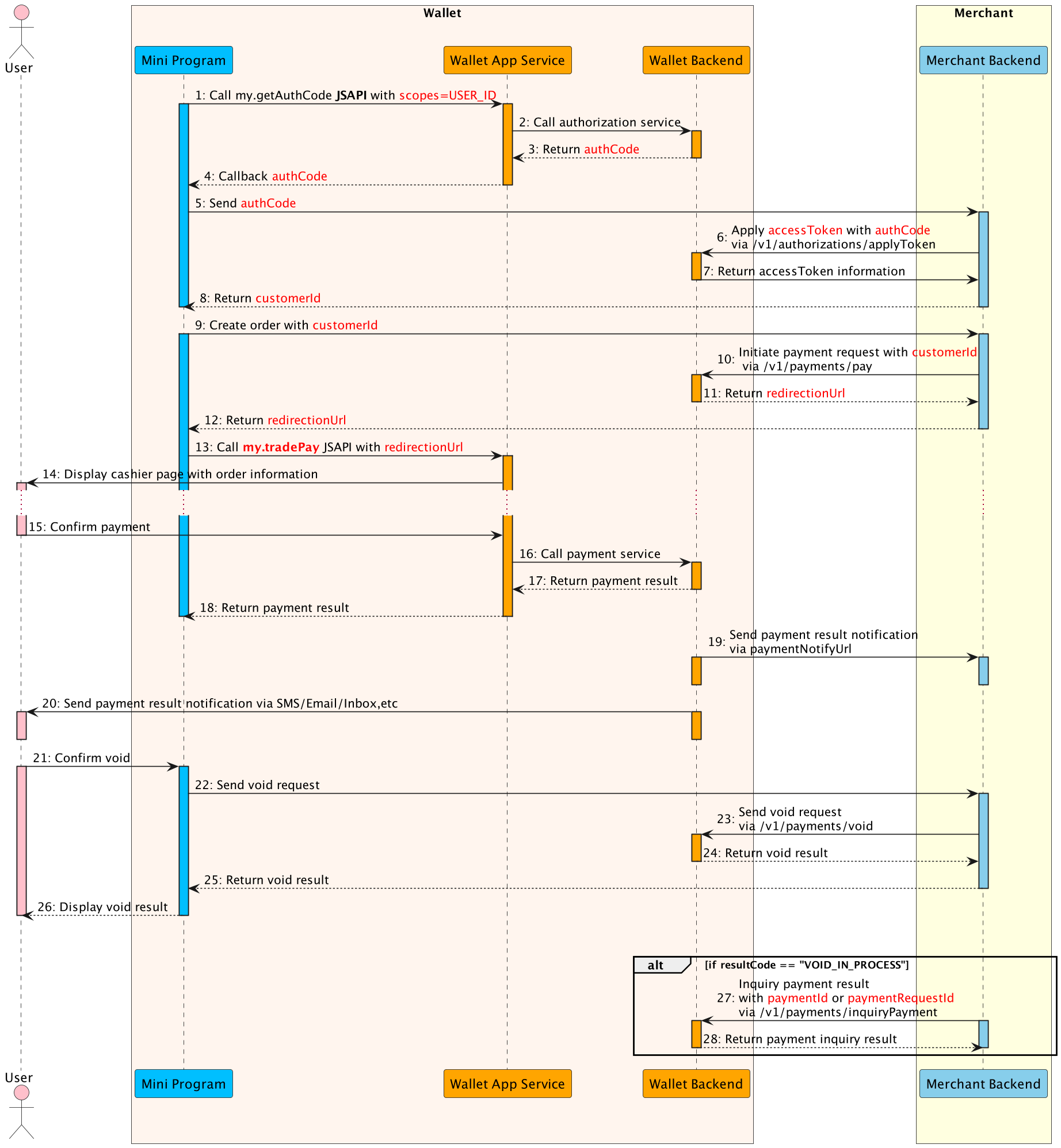
- The Mini Program calls this
my.getAuthCodeJSAPI with specificscopes(USER_ID) to request an authorization code. - The E-wallet App service calls authorization service to processes the authorization information.
- The E-wallet backend verifies the authorization information, generates the
authCodeand returns. - The E-wallet App service returns the
authCodeto the Mini Program. - The Mini Program sends the
authCodeto the merchant backend. - The merchant backend calls the applyToken API with
authCodeto apply theaccessToken. - The E-Wallet backend returns
accessTokeninformation to the merchant backend, such ascustomerId, accessToken, refreshToken, etc. - The merchant backend returns customerId to mini program.
- The Mini Program creates an order with
customerId. - The merchant backend calls the payment API to initiate payment flow, including
customerIdas referenceBuyerId, paymentNotifyUrl(optional), etc. - The E-Wallet backend returns payment detail information the merchant backend, such as
redirectionUrl. - The merchant backend passes the payment detail information to the Mini Program.
- The Mini Program calls the
my.tradePayJSAPI withredirectionUrlto conduct the payment. - The E-Wallet App Service displays the cashier page with order information, such as amount, order details, etc.
- The user confirms the payment in the cashier page.
- The E-Wallet App Service calls payment service and execute the payment process.
- When the payment reaches the final status, the E-wallet backend returns the payment result to the Mini Program (Step 18).
- The E-Wallet App Service returns the payment result to mini program.
- Also the E-wallet backend notifies the merchant backend of the payment result with paymentNotifyUrl provided in Step 10(Step 19).
- Finally, E-wallet backend notifies the user of the payment result via SMS/Email/Inbox message (Step 20).
- If the merchant cannot fulfill the order or needs to void the transaction, the merchant initiates the void process (Step 21).
- The merchant backend calls the
voidAPI to return the money to the customer (Step 23). - Send void request via
/v1/payments/void. - The E-Wallet backend returns the void result to the merchant backend.
- The merchant backend returns void result.
- And the Mini Program displays the void result to the user(Step 26).
Alternative flow:
When the E-Wallet backend returns the resultCode as VOID_IN_PROCESS, the merchant can call inquiryPayment API to query void result (Step 27).
Endpoint
| Method | Path |
|---|---|
POST | /v1/payments/void |
API Structure
A message consists of a header and body. The following sections are focused on the body structure. For the header structure, see: OpenAPIs Overview.
Request
| Field | Type | Required | Description | Example |
|---|---|---|---|---|
voidRequestId | string | Yes | The unique ID of a void request generated by a merchant. Max. length: 64 characters. | "2023010123456789013" |
paymentId | string | Yes | The payment ID of the original authorization to be voided. Max. length: 64 characters. | "202312061112128001016xx" |
voidAmount | object | No | The void payment amount. The voidAmount is mandatory in partial void scenario. The voidAmount is optional in full void scenario. | { "value":"40000", "currency":"IQD" } |
extendInfo | string | No | The extension information that wallets and merchants want to describe. The format should be JSON format. Max. length: 2048 characters. | "extendInfo: This is additional information" |
Sample Request
{
  "voidRequestId": "2023010123456789013",
  "paymentId": "202312061112128001016xx",
  "voidAmount": {
    "value": "40000",
    "currency": "IQD"
  }
}
The
voidRequestIdis used for idempotence—repeat submissions with the same ID will yield the same final result.
Response
| Field | Type | Required | Description | Example |
|---|---|---|---|---|
result | object | Yes | The request result, which contains information such as result status and error codes. | { "resultCode": "SUCCESS", "resultStatus": "S", "resultMessage": "Success." } |
voidRequestId | string | No | The unique ID of a void request generated by a merchant. Max. length: 64 characters. | "2023010123456789013" |
voidId | string | No | The unique ID of a void request generated by the wallet. Max. length: 64 characters. | "202312061112128017xxx" |
Sample Response
{
  "result": {
    "resultCode": "SUCCESS",
    "resultStatus": "S",
    "resultMessage": "Success."
  },
  "voidRequestId": "2023010123456789013",
  "voidId": "202312061112128017xxx"
}
Result Process Logic
In the response, the result.resultStatus field indicates the result of processing a request. The following table describes each result status:
| resultStatus | Description |
|---|---|
S | It means that the void is successful. The corresponding result.resultCode is "SUCCESS", and the result.resultMessage is "Success.". |
U | It means that the status of the void is unknown. The corresponding result.resultCode is UNKNOWN_EXCEPTION, and result.resultMessage is "An API calling is failed, which is caused by unknown reasons". For details, see the Common error codes section.What needs to note is as follow: • U status (inquiry/retry still gets U) can not set to fail or success on merchant/partner system. If other response (almost never occur), the merchant/partner should process like U. |
F | It means that the void fails. The corresponding result.resultCode and result.resultMessage may vary based on different situations. For details, see the Error codes section. |
Error Codes
Error codes are usually classified into the following categories:
- Common error codes are common across all mini program's APIs.
- API-specific error codes are listed in the following table.
| resultStatus | resultCode | resultMessage |
|---|---|---|
F | ORDER_NOT_EXISTS | The order does not exist. |
F | ORDER_STATUS_INVALID | The order status is invalid. |
U | VOID_IN_PROCESS | The void is still under process. |
F | CURRENCY_NOT_SAME | The currency of a user's payment is not the same as the original payment currency. |
F | VOID_AMOUNT_EXCEEDS_AUTH_LIMIT | The total void amount exceeds the limit of the authorized payment amount. |
F | MUTEX_OPERATION_IN_PROCESSING | There is another payment void, confirm, or capture in processing. |
F | ORDER_UNSUPPORTED_OPERATION | The order is not support void. |
F | REPEAT_REQ_INCONSISTENT | Repeated submit, and requests are inconsistent. |
F | PARTNER_NOT_EXIST | The partner does not exist. |
F | USER_NOT_EXISTS | The user does not exist. |
F | USER_STATUS_ABNORMAL | The user status is abnormal. |
F | PARTNER_STATUS_ABNORMAL | The partner status is abnormal. |
Related Links
- pay (Use product code
51051000101000100008for escrow) - merchantAccept
- cancel
- refund
- inquiryPayment