
Overview
Overview
Mini Programs offer a comprehensive set of OpenAPIs to achieve various capabilities, such as payment processing, user authorization, and data exchange. These APIs are designed for backend-to-backend communication between your merchant backend and the Super Qi backend using HTTPS requests.
This guide covers the message structure, authentication, and signature generation required for all OpenAPI communications.
Project Setup
Before sending requests to the Super Qi backend, ensure you have:
- Client ID: Provided during merchant onboarding
- Private Key: Submitted when creating your merchant account (used to sign all requests)
- Public Key: Registered with Super Qi for signature verification
Versioning
The current API version is v1. The version is specified in the URL path.
Example:
https://{host}/v1/payments/pay
Different versions of the same API are treated as separate endpoints:
/v1/payments/payis different from/v2/payments/pay
Message Structure
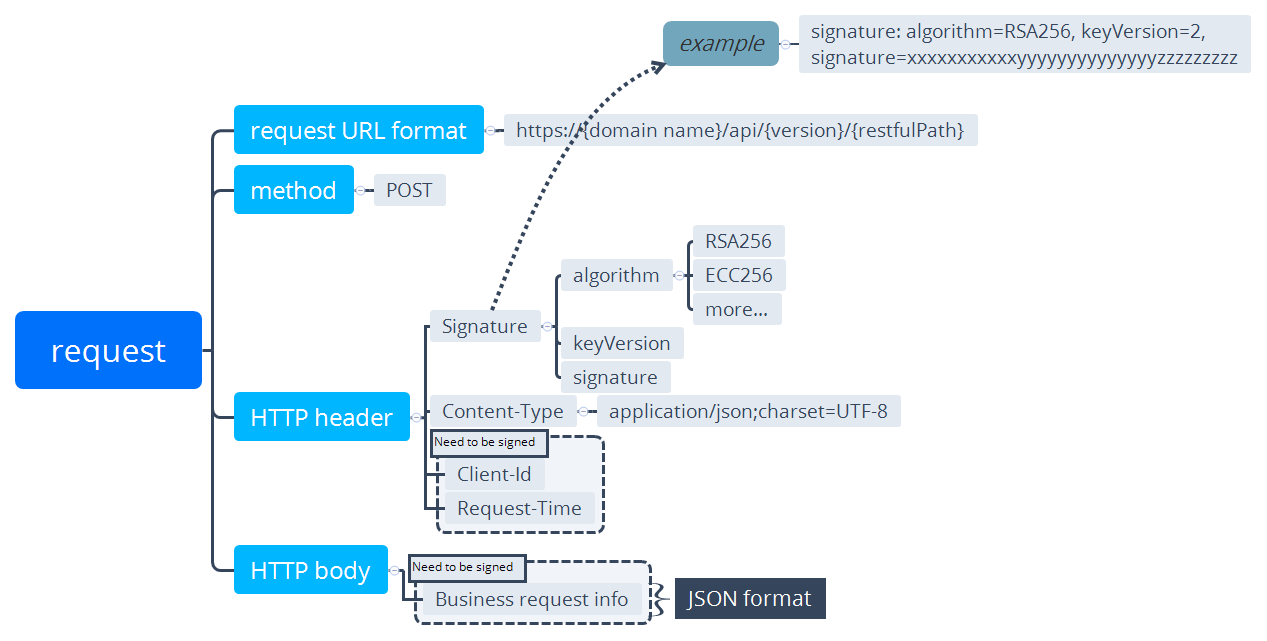
Understanding how OpenAPI requests and responses are structured is essential before making any API calls. The diagram below illustrates the complete request structure:
Request URL
The request URL follows this structure:
https://{host}/{restful_path}
Components:
- host: The base gateway URL assigned to you by the Super Qi team. It is shared privately during onboarding and is not published here — always use the value you received.
- restful_path: The path to the specific API interface, formatted as
/{version}/{resource}/{action}— for example,/v1/payments/pay. - version: The current API version is
v1.
Examples:
https://{host}/v1/payments/pay
https://{host}/v1/authorizations/applyToken
https://{host}/v1/payments/refund
Each interface is uniquely identified by its restful_path.
Request Method
All OpenAPI requests use the POST method for HTTP requests.
POST /v1/payments/pay
Host: {host}
Authentication and Security
All requests to Super Qi OpenAPIs require proper authentication through request headers and digital signatures.
Request Headers
Each request must include the following headers:
| Header | Required | Description | Example |
|---|---|---|---|
Content-Type | Yes | Media type of the request body. Always use JSON with UTF-8. | application/json; charset=UTF-8 |
Client-Id | Yes | Your unique merchant identifier provided during onboarding. | 2021001234567890 |
Request-Time | Yes | ISO 8601 timestamp when the request is sent. | 2024-01-01T12:00:00-07:00 |
Signature | Yes | Digital signature for request authentication and integrity. | algorithm=RSA256, keyVersion=1, signature=**** |
Complete Header Example:
Content-Type: application/json; charset=UTF-8
Client-Id: 2021001234567890
Request-Time: 2024-01-01T12:00:00-07:00
Signature: algorithm=RSA256, keyVersion=1, signature=base64_encoded_signature
Signature Generation
The signature ensures request authenticity and prevents tampering. Follow these steps to generate a valid signature:
Step 1: Create Sign Content
Combine the HTTP method, path, and request details in this format:
{HTTP_METHOD} {PATH}\n
{CLIENT_ID}.{REQUEST_TIME}.{JSON_CONTENT}
Example:
POST /v1/authorizations/applyToken
2021001234567890.2024-01-01T12:00:00-07:00.{"grantType":"AUTHORIZATION_CODE","authCode":"281011130..."}
Step 2: Hash the Content
Use SHA-256 to hash the sign content created in Step 1.
const hash = SHA256(signContent);
Step 3: Sign with RSA
Sign the hash using your private key with:
- Algorithm: RSA
- Padding: PKCS1v15
- Hash: SHA-256
const signature = RSA_Sign(hash, privateKey, PKCS1v15);
Step 4: Base64 Encode
Encode the signature in base64 format.
const base64Signature = Base64.encode(signature);
Step 5: Add to Header
Include the signature in the request header:
Signature: algorithm=RSA256, keyVersion=1, signature={base64Signature}
Signature Header Components:
| Component | Description | Value |
|---|---|---|
algorithm | Digital signature algorithm (case-insensitive) | RSA256 (default) |
keyVersion | Version of the key used for signing | 1 (or your current key version) |
signature | Base64-encoded signature value | Generated in Step 4 |
Code Examples
Here are complete signature generation examples in different programming languages:
signContent := fmt.Sprintf("%s %s\n%s.%s.%s",
  httpMethod, path, clientID,
  requestTime, content
)

hash := sha256.Sum256([]byte(signContent))
signature, err := rsa.SignPKCS1v15(nil, privateKey, crypto.SHA256, hash[:])

base64Signature := base64.StdEncoding.EncodeToString(signature)
import crypto from "crypto";

const signContent = `${httpMethod} ${path}\n${clientID}.${requestTime}.${content}`;

const hash = crypto.createHash("sha256").update(signContent).digest();
const signature = crypto.sign("RSA-SHA256", hash, privateKey);

const base64Signature = signature.toString("base64");
Request Body
The request body contains detailed request information in JSON format. All request bodies are JSON objects with parameters specific to each API endpoint.
Parameter Structure
Each API has its own required parameters. Here are some common examples:
applyToken Request:
{
  "grantType": "AUTHORIZATION_CODE",
  "authCode": "2810111301lGzcM9CjlF91WH00039190xxxx"
}
pay Request (Cashier Payment):
{
  "productCode": "51051000101000000011",
  "paymentRequestId": "UDQzzvxwvyvUDxGqhMHUlIBpGkydOQC6",
  "paymentAmount": {
    "currency": "IQD",
    "value": "100000"
  },
  "order": {
    "orderDescription": "order_description",
    "buyer": {
      "referenceBuyerId": "216610000000003660xxxx"
    }
  },
  "paymentNotifyUrl": "https://www.merchant.com/paymentNotify"
}
Response Structure
All OpenAPI responses follow a consistent structure with a result object containing status information.
Response Header
Response headers contain metadata about the response:
| Header | Description |
|---|---|
Response-Time | ISO 8601 timestamp when the response was generated |
Content-Type | Media type of the response body (typically application/json; charset=UTF-8) |
Response Body
General Structure:
{
  "result": {
    "resultCode": "SUCCESS",
    "resultStatus": "S",
    "resultMessage": "success"
  },
  "additionalField1": "value1",
  "additionalField2": "value2"
}
Result Object Fields:
| Field | Type | Description |
|---|---|---|
resultCode | string | Specific result code (e.g., SUCCESS, INVALID_PARAMETER, PAYMENT_IN_PROCESS) |
resultStatus | string | General result status: S (Success), F (Failed), U (Unknown), A (Accepted) |
resultMessage | string | Human-readable description of the result |
Result Status Values
| Status | Meaning | Action Required |
|---|---|---|
S | Success - Operation completed successfully | Proceed with business logic |
A | Accepted - Request accepted, further action required | Follow instructions in response (e.g., redirect user) |
U | Unknown - Result uncertain due to system error | Retry or query status; do not assume success/failure |
F | Failed - Operation failed | Check resultCode and handle error appropriately |
Response Example
HTTP/1.1 200 OK
Content-Type: application/json; charset=UTF-8
Response-Time: 2024-11-15T14:30:01.234+03:00

{
  "result": {
    "resultCode": "ACCEPT",
    "resultStatus": "A",
    "resultMessage": "accept"
  },
  "paymentId": "2023120611121280010016600900000xxxx",
  "redirectActionForm": {
    "redirectionUrl": "https://www.wallet.com/cashier?orderId=xxxxxxx"
  }
}
Related Documentation
- inquireUserInfo - Inquiring the user's information
- pay - payment APIs guide
- applyToken - Exchanging authCode for an accessToken